
Runs never guess
Every step executes exactly as written. No run acts on an AI answer, so the same test on the same data gives the same result.
AutoTestX uses AI where it saves your team time: writing steps, finding what moved, explaining what broke, and answering your AI assistant. The runs themselves stay deterministic, and every change to a test is approved by a person.
Test case, as your team wrote it
✦ Draft steps
{{secret.AGENT_USER}}from line 1New requestfrom line 2Facilitiesfrom line 3Heating not working on floor 3from line 4Submitfrom line 5Request SR-… createdassumed · checkCustomer portal✓{{secret.AGENT_USER}}✓New requestHealed: #btn_new_7f2 → button “Create request” · 96% match · waiting for your approval✦Facilities✓row 3 of requests.xlsx✓Submit✓Request SR-1042 created✓› Run the Checkout tests on Staging and tell me if anything broke.
autotestx · run_suite Checkout on Staging · 12 tests
11 passed · 1 failed · 2 min 41 s
autotestx · explain_failure Apply discount code
Apply discount code failed at step 4: it expected “Discount applied”, but the page said “Code expired”.
The button and the form worked, so this is the test data: the promo code has expired. It passed until 29 Sep. Renew it in the staging seed data.
Failure class · Test dataEvidence · step 4 screenshot
Illustrations of the AI step writer, a healed run, and an AI assistant using the AutoTestX MCP server.
Every step executes exactly as written. No run acts on an AI answer, so the same test on the same data gives the same result.
AI drafts, suggests and explains. A person approves anything that changes a test.
Each AI answer comes with the evidence it rests on, beside the deterministic result it never replaces.
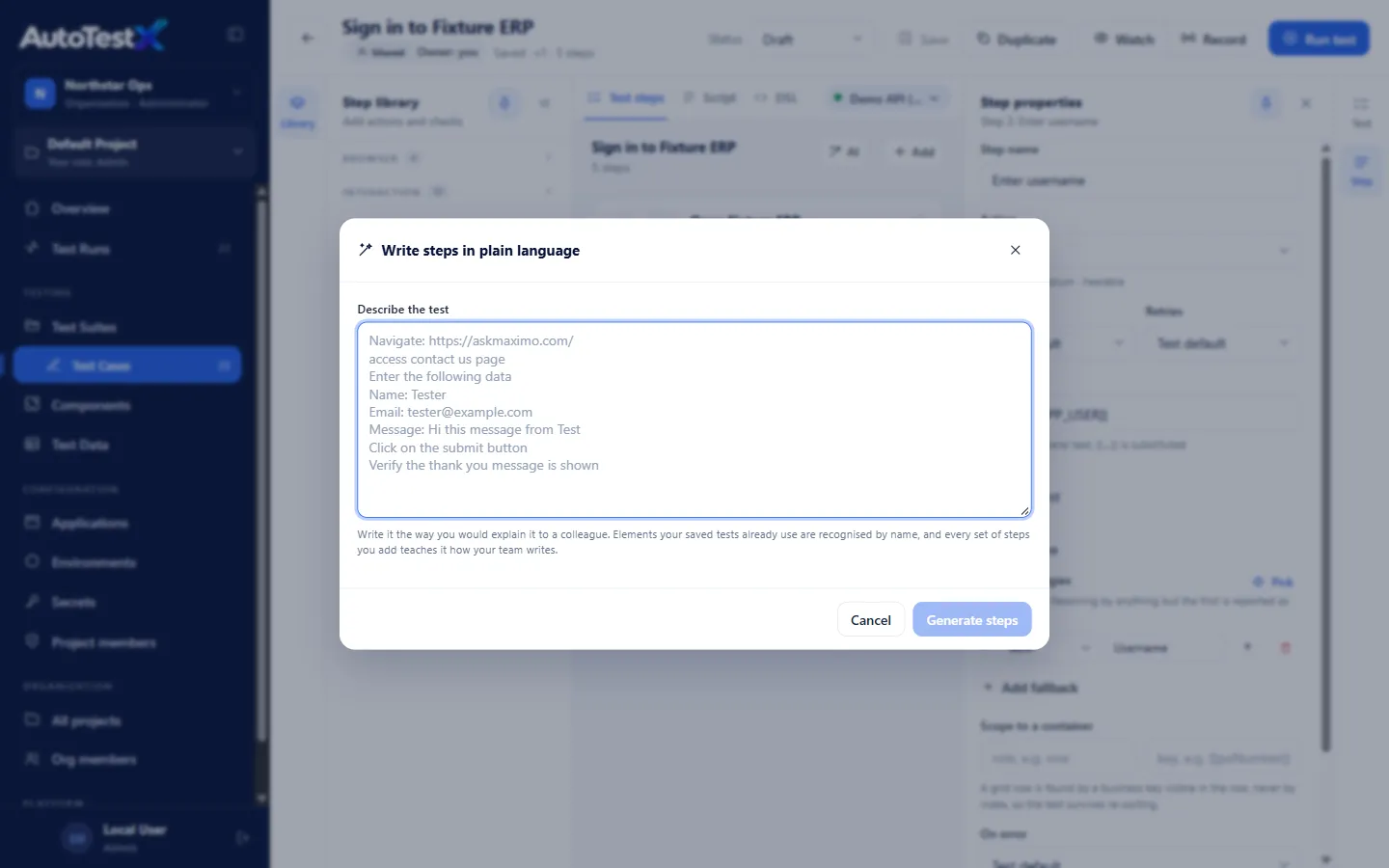
Paste a test case the way you would explain it to a colleague, one action or check per line. The step writer drafts the steps, reusing the fields your saved tests already find. Each draft step shows the sentence it came from, and flags anything it had to assume.
Self-healing first tries free, deterministic matching. When that finds look-alikes but can’t prove one, for example “Purchase Requisition” renamed to “PR Request”, an AI is asked to choose among the candidates, or to say none of them.
Step 4 · Click Purchase Requisition
The AI compared: “name=PR Request” · “name=Purchase Requisition”. Same menu, same position.
Illustration of a suggestion card
Every failure is classed by rules first, from what the run recorded: the error, failed requests, messages on the page and the test’s history. When the rules can’t decide, AI diagnosis explains the likely cause in plain language, beside the class it never replaces.
The button and the form worked; the promo code SAVE10 has expired. Renew it in the staging seed data, or use a code that does not expire.
Illustration of a failed step
AutoTestX includes an MCP server, the open standard AI assistants use to call other tools. Connect Claude Code, Cursor, VS Code (GitHub Copilot) or Claude Desktop once, with an API token, then ask in plain words. The assistant runs the suite on the AutoTestX server, reads the evidence of each failure, and in an editor can fix the code and run the suite again.
Connect your assistant →Tools your assistant gets
Every AI feature runs on one Anthropic key per organization, chosen by an organization admin. Changes are written to the audit log, without the key.
| Choice | AI runs on | Counts against the plan |
|---|---|---|
| Your organization’s own Anthropic key | Your Anthropic account | No. Usage is still listed. |
| The AutoTestX key (default, except on Enterprise) | AutoTestX’s Anthropic account | Yes |
| AI off | Nothing | – |
| Plan | AI generations |
|---|---|
| Free | 100 a month |
| Team | 1,500 a month |
| Business | 5,000 a month |
| Enterprise | Your own key, no AutoTestX limit |
A saved key is stored encrypted and shown only as its last four characters. The step writer, diagnosis and AI healing share one allowance. AI warns at 80% of it, keeps working to 110%, then pauses until the reset or a top-up; building and running tests never pause. One person can make up to 100 AI requests a day. Plans →
Yes. An organization admin can turn AI off for every project. AI healing is also off in each project until an Admin or Test Manager turns it on. Everything else in AutoTestX works without AI.
No. The step writer’s drafts are saved only when a person saves them. An AI healing pick is filed as a suggestion and never acted on during a run, and self-healing rules never apply one.
Only what each feature needs: your test case text and known field names (step writer), the candidate elements’ roles, labels and ids (healing), the named details of a failure (diagnosis). Never screenshots, recordings or secret values.
Anthropic’s Claude, through Anthropic’s API, on the AutoTestX key or your own. Amazon Bedrock and Google Vertex are planned.
One successful AI request. Failed requests are not counted, and on your own key nothing counts against the plan.
In 30 minutes: a live demo of AI drafting, healing and explaining tests on a representative flow, and what your team would need for a pilot.