AutoTestX
AutoTestX for Maximo · the Maximo edition

Every Maximo change, verified with AI by the analysts who own it.

Turn the UAT test cases you run by hand (work orders, purchase orders, inventory) into automated tests with the AI step writer, run them from your spreadsheet data, and keep step-by-step screenshot evidence. No developers needed.

3 design-partner places: a free 60-day pilot. Or start on the Free plan

A live demo on a representative Maximo flow, and what your IT team would need. Your own flow comes next, in a co-build session.

Run #1042 · Create purchase orderUAT
data row 3 / 10vendors.xlsx08:14:07
  1. 01Go to Purchase Orders✓
  2. 02Click New PO✓
  3. 03Select Vendor from lookupACME-SUPPLY✓
  4. 04Add PO line · Item1004✓
  5. 05Type Quantity12✓
  6. 06Select GL Account6100-200-350Found by fallback: label "GL Debit Acct"!
  7. 07Save the record✓
  8. 08Expect messageBMXAA4205I Record has been saved✓
7 passed1 warned0 failed8 screenshots
The AI for Maximo

The same AI, tuned for Maximo’s screens.

Everything in the AutoTestX platform, plus what Maximo’s lookups, generated ids and BMXAA messages need.

AI

Drafts Maximo tests from your UAT cases

Paste the steps from your UAT spreadsheet. The AI step writer drafts them using the Maximo fields your saved tests already find (lookups, tabs and table rows), and learns your project’s wording as you keep tests.
AI

Heals through generated ids

Maximo regenerates ids and classes. The Generated ids healing profile trusts the label, heading and table row instead, and, when look-alikes can’t be told apart, AI healing suggests which one is meant, for a person to approve.

AI

Knows a BMXAA error from a broken test

A BMXAA…E message classes the failure as a Maximo business rule, so nobody “fixes” a test for an application rule. AI diagnosis explains the rest in plain language.

Guide: from Excel test cases to automated tests, with a Maximo work order example →

The problem

Every change means re-testing by hand.

  1. Every fix pack, customization and upgrade means re-running the same UAT spreadsheet by hand.
  2. Evidence ends up as screenshots pasted into Word.
  3. And the move to MAS means doing it all again, at a bigger scale.
How it works

From a manual test case to repeatable evidence, in four steps.

Screens from our demo environment, with sample data.

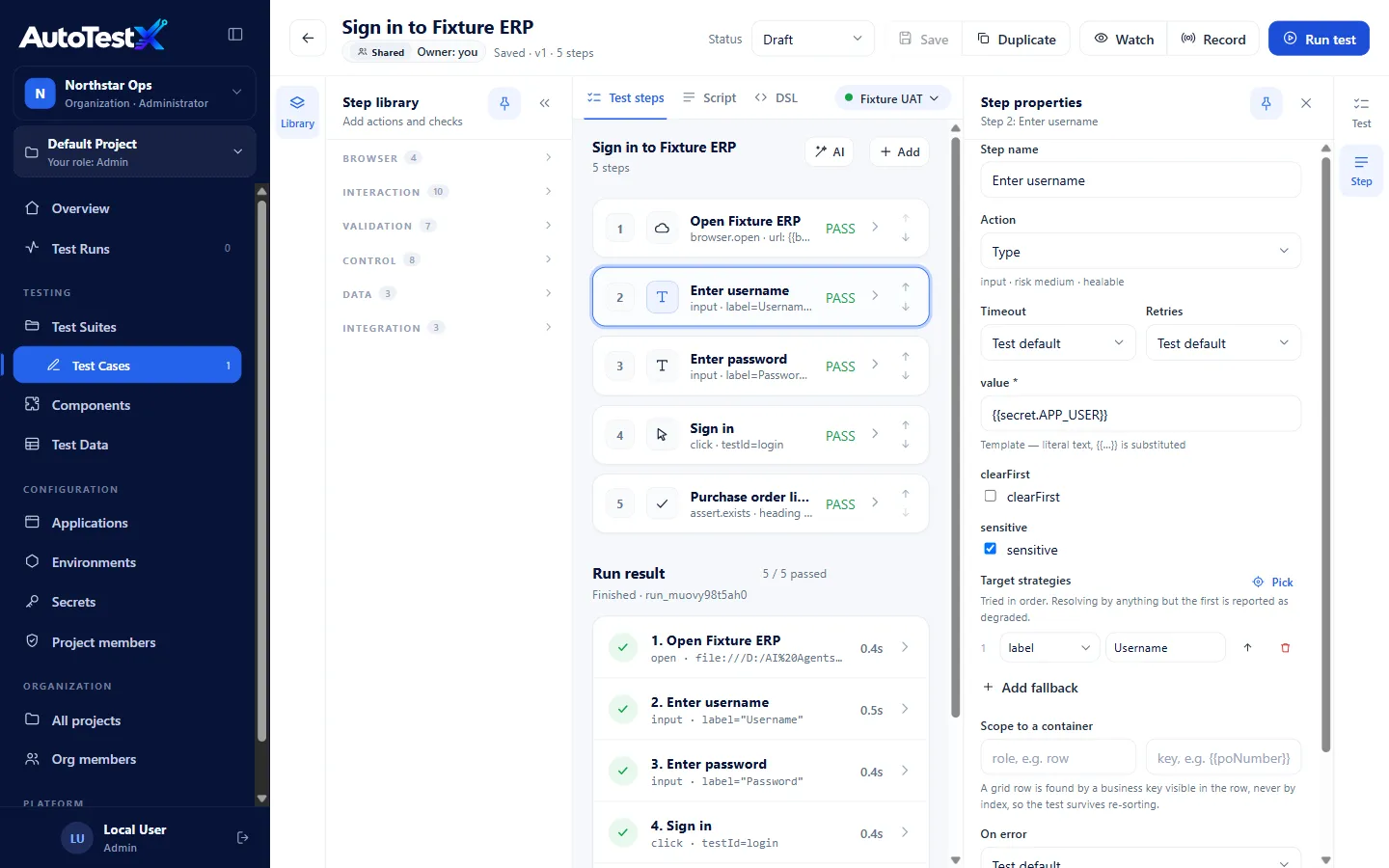
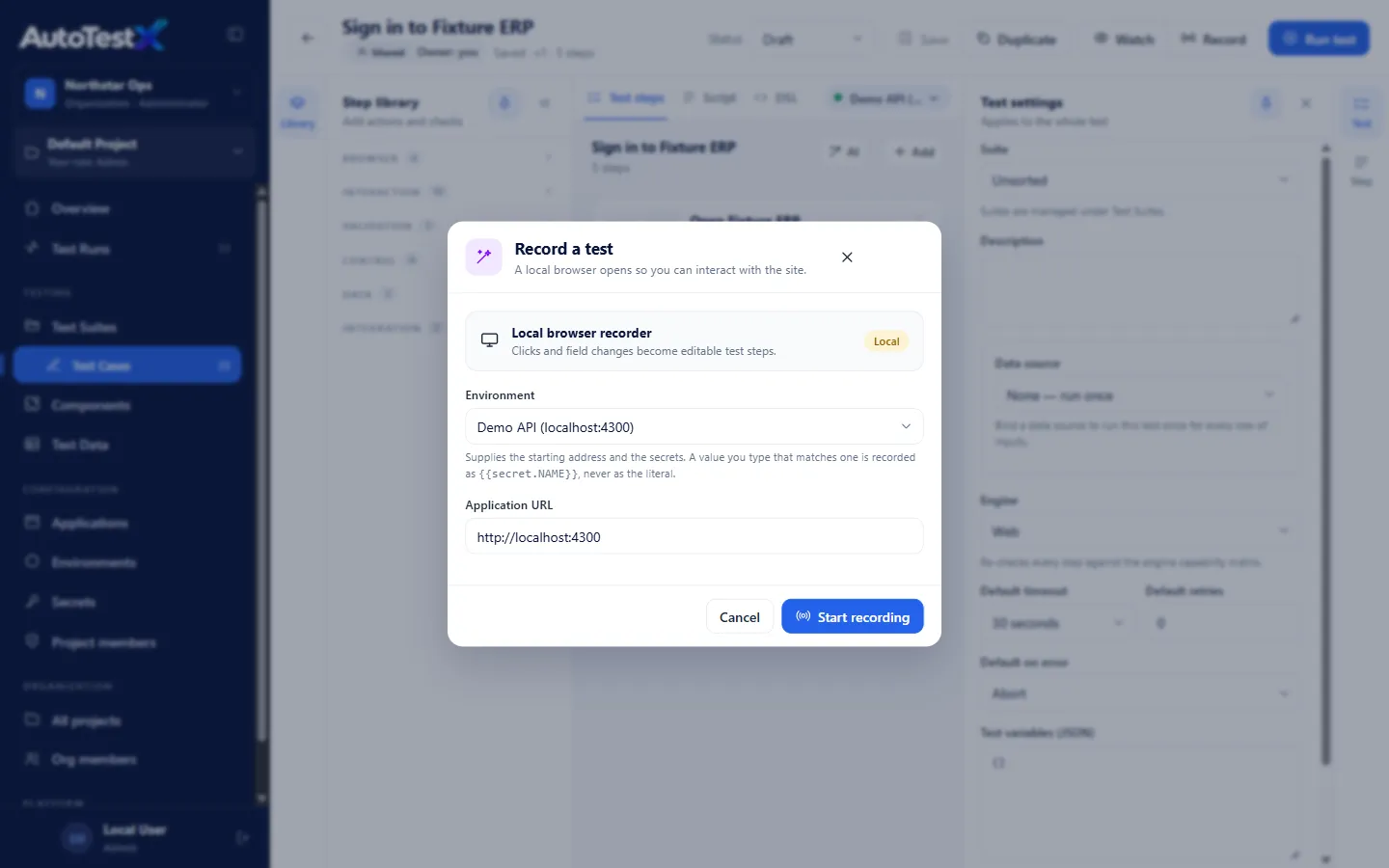
  1. 01

    Record

    Click through Maximo as you normally would. AutoTestX captures each step with several ways to find every field. When one stops working, the run is flagged before anything fails, and a renamed or moved field gets a proposed fix.

    The Record dialog in AutoTestX
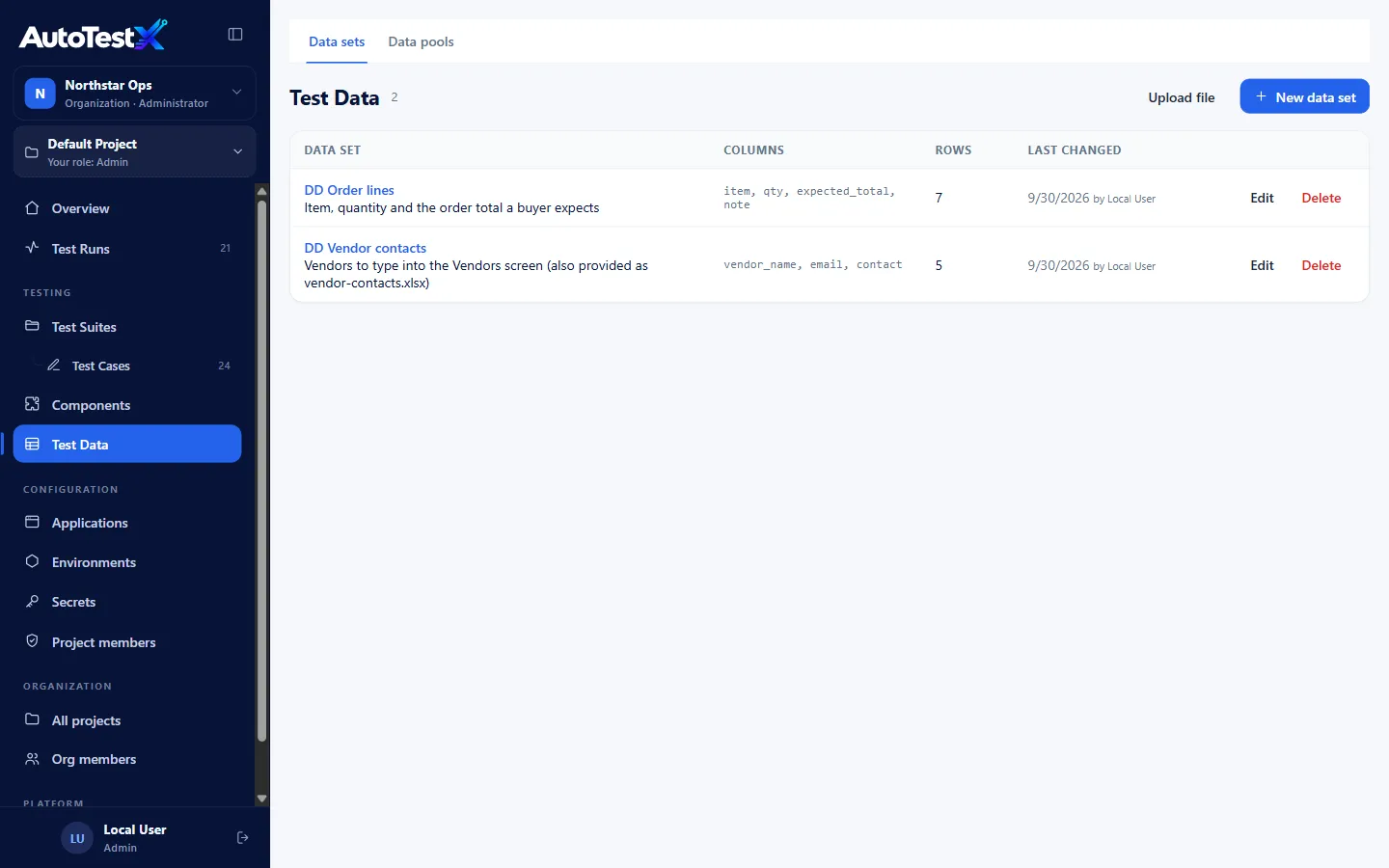
  2. 02

    Add your data

    Attach an Excel sheet of test data. One test runs once per row: ten vendors, ten runs.

    A test data sheet attached to a test
  3. 03

    Run

    Run the whole set against your test environment from the app, or from your CI pipeline with the command-line runner.

    A run finishing with every step passed
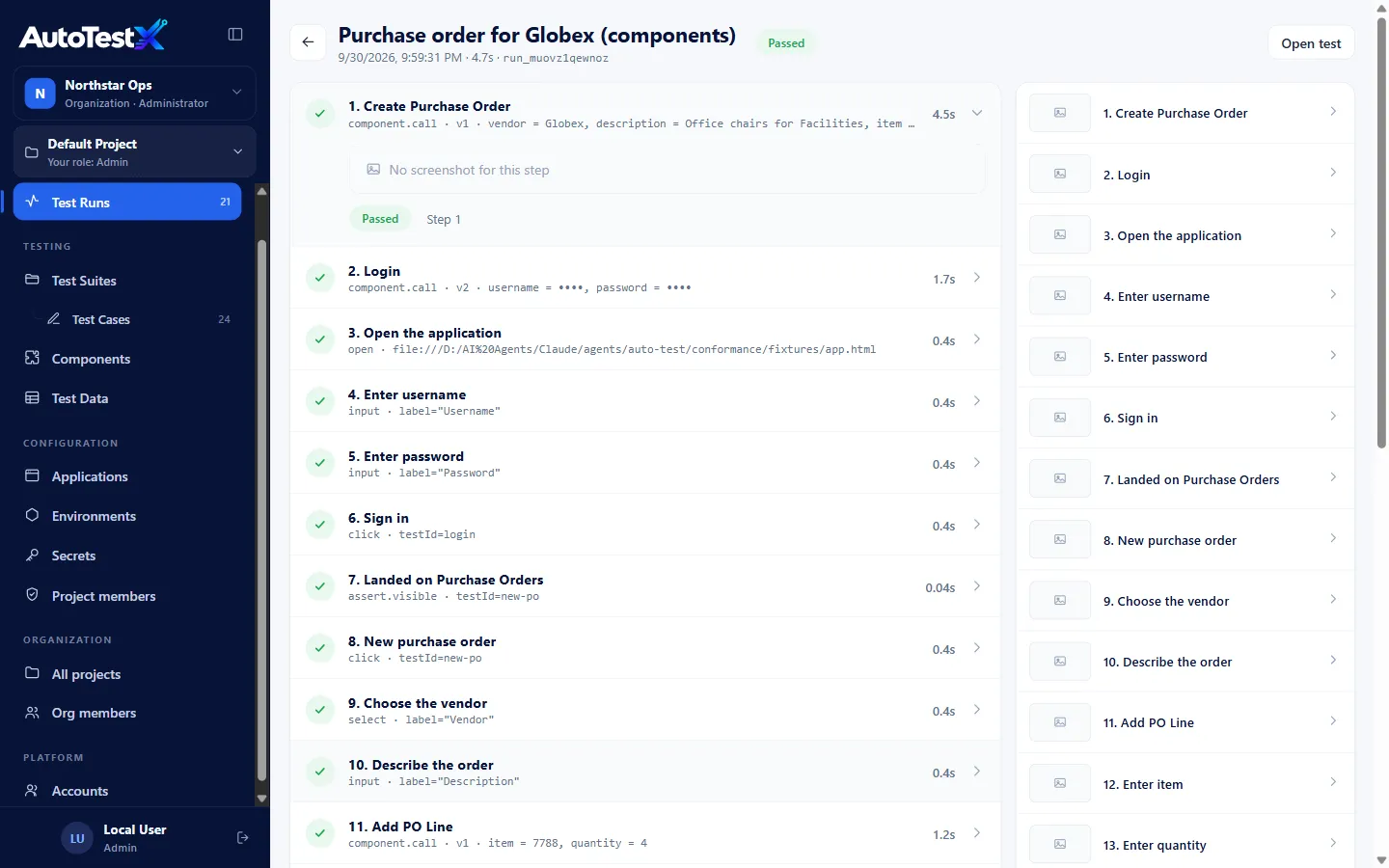
  4. 04

    Prove it

    Every run produces a report: what was done, with which data, and a screenshot of every step.

    A run report with a screenshot per step
When teams use it

Every time Maximo changes, the same tests run again.

Fix packs

Fix packs and patches

Re-run the whole regression set as one suite the day a fix pack lands in test.

How it works →
Changes

Customizations and scripts

Every automation script, new field or workflow change gets checked against the flows it could break.

How it works →
MAS

The move to MAS

Build the tests on today’s Maximo. They become the baseline for the full regression pass the migration needs.

How it works →
Audit

Change boards and auditors

Hand over a report with the data used and a screenshot of every step, not screenshots pasted into Word.

How it works →
Built for Maximo

Made for the screens your testers actually use.

Lookups, tabs, frames and table rows: the parts of Maximo that break generic recorders.

Lookups and tables

GL accounts, vendors, items. Table rows are found by business key (the PO line for item 1004), not by position.

Maximo's own messages as checks

The recorder turns system messages into assertions: exactly what testers check by eye today.

Early warning on UI drift

When a step finds its field by a fallback method, the run is flagged warned before anything fails.

Records inside your network

A small agent records in your tester's own browser, on Windows or Mac. Outbound HTTPS only, no admin rights.

BMXAA errors classed for you

A failure with a BMXAA…E message is classed as a Maximo business rule, so nobody "fixes" a test for what is really an application rule.

Evidence an auditor can read

A plain-language view of every test, per-step screenshots and full run history.

Works with
  • Excel and CSV test data
  • REST API steps
  • Any CI: exit codes and JSON results
  • Microsoft Edge or Chrome
  • Windows or Mac agent for recording
  • Tests stored as documented JSON
Who it's for

One set of tests, three people who rely on it.

Business analysts and testers

Record the flows you already test by hand, read them as plain steps, and fix them yourself.

  • No scripting, no developer queue
  • Your UAT spreadsheet becomes the test data
  • Unlimited Tester and Viewer seats within your organization’s plan

Test managers and QA leads

See what ran, on which data, and what failed, across every application team.

  • Suites, run history and a dashboard
  • Five roles per project
  • Evidence a change board can read

Maximo and IT leads

Catch regressions before a change reaches production, without a new platform to run.

  • Hosted in Canada, or a dedicated instance
  • Agent with no admin rights, outbound HTTPS only
  • Command-line runner for your CI
  • Hosted in Canada (AWS)
  • Dedicated instance available
  • Secrets redacted from logs and reports
  • Five roles per project, audit log
IT pre-check →
FAQ

What Maximo teams ask us first.

Pricing questions are on the pricing page.

Is this AI? We can’t have AI making decisions in our tests.

Runs are deterministic: each step does exactly what is written, and no run acts on an AI answer. AI is optional. It can draft steps from plain text, and, if you turn them on, suggest a heal or explain a failure, always as a suggestion a person reviews. An organization admin can turn AI off altogether.

Does it heal tests automatically when the screen changes?

It heals, and you decide who changes the test. When a field can’t be found, AutoTestX compares the page with the last passing run, without AI. If one match clearly wins, the run carries on with it and the fix is proposed with its evidence; if not, the step stops and the fix is proposed. A person approves it, or, on Business and Enterprise, a rule your Test Manager sets applies safe fixes on its own. Risky steps like Delete or Approve stop instead of continuing on a healed field. An AI suggestion never lets a run carry on and no rule ever applies one. Every decision is kept in an audit trail and can be reverted.

Our IT team won’t let us install software.

The agent installs per user with no admin rights, and makes one outbound HTTPS connection: no inbound ports, no firewall change. It is not code-signed yet, so endpoint protection may flag it; the IT pre-check says what to expect.

Does our Maximo test system have to be reachable from the internet?

For unattended runs, yes. Runs from the app, schedules and suite runs execute on the AutoTestX server in AWS Canada, so it must reach your test environment, for example by allowlisting its fixed address. Recording and watched runs use the tester’s own browser and work behind your VPN. The IT pre-check sets out the options.

Our testers use Macs.

The agent runs on macOS too. Until Apple has signed and notarized it, it installs with one Terminal command instead of a download. Runs from the app or your CI pipeline need no agent at all.

We’re moving to MAS. Should we wait until after?

That is when you need regression tests most. Tests built now are the baseline for the migration’s full regression pass, so the comparison is ready when the move happens.

We already have a test automation tool.

If it works well on your Maximo flows, keep it. If scripts need developers or struggle with lookups and tables, the Free plan or a pilot on ten of your cases is a cheap way to compare.

Request a session

See a Maximo flow drafted, healed and explained by AI.

In 30 minutes: a live demo of AI drafting, healing and explaining tests on a representative flow, and what your team would need for a pilot.