AutoTestX
Self-healing

When the screen changes, you get a fix to approve, not a mystery.

A renamed button or a regenerated id shouldn’t cost anyone an afternoon. AutoTestX finds the element the step meant, keeps the run going where that is safe, and proposes the fix with its evidence. Your team decides; rules can take the safe decisions for you.

The suggestion

Every fix comes with its evidence.

The current and the proposed target, every signal that was compared with its value then and now, a confidence score, and the run that found it. Approve it, edit and approve it, or reject it. Only an approval changes the test, and the new target is stamped so you can always see where it came from.

The test never changes during a run. A healed run tells you the test would pass with the fix.

HealedStep 7 · Click Save96% match
Was#btn_8f3a
Nowrole button, name “Save changes”
  • Same role: button
  • Same position in the toolbar
  • Same nearest heading: Order details
  • Text changed: “Save” → “Save changes”
  • Id regenerated
ApprovePick insteadReject

Illustration of a suggestion card

How a heal is found

Three tiers, cheapest and most certain first.

Healing runs only when a step’s element cannot be found.

  1. Tier 0

    Promote a fallback

    Another way of finding the element already worked, so the step was warned. Suggest making it the main one.

    Free, deterministic
  2. Tier 1

    Fingerprint match

    Compare the page with the element as it was on the last passing run: its name, label, test id, attributes, text, heading, row and position.

    Free, deterministic
  3. Tier 2

    AI pick (optional)

    Tier 1 found look-alikes but couldn’t prove one. An AI chooses among them, or says none. Off until a project turns it on.

    One AI generation per new question

An AI pick is never acted on during a run and rules never apply one: it always waits for a person. AI in AutoTestX →

Before a run acts on a match, it must pass four checks.

Confidence
70% for low-risk steps; 78% for medium-risk steps and every check, because an assertion on the wrong element can hide a defect.
Lead
At least 12 points ahead of the next candidate, so two near-identical buttons are never guessed between.
Identity
A match on something the element is known by (name, text, label, id, test id), never on position alone.
Kind
A Type step is only healed onto a field, never onto a button that now sits where the field was.
What happens in a run

Risk decides whether the run carries on.

Heals, then asks you

The run continues with the found element, the step is marked healed, and a fix waits for approval. One run finds every broken step, not just the first.

  • Generated or rotating ids
  • Renamed test ids, labels and button text
  • Fields moved on the page, into an iframe or shadow DOM
  • A button that became a link, or a dropdown that became a combobox
  • Grid rows rebuilt with new markup

Stops, and suggests

The step still fails, with the proposed fix attached, because acting on it during the run could do harm or hide a defect.

  • Delete, remove, submit, pay, approve or send
  • Typing into a password field
  • A likely match that isn’t certain enough
  • Two candidates too close to tell apart

Never heals

These fail clearly, with the reason, so a real regression is never painted green.

  • The element is really gone
  • Open, URL checks, API calls and custom code
  • Sign-in failures, server and network errors
  • A lookup record that doesn’t exist
Rules · Business and Enterprise

Let rules take the safe decisions.

A rule decides some suggestions without a review: apply low-risk click fixes seen in two runs or more, always require review for payment tests, or reject fixes you never want. Rules act only after a run has finished, and a fix they apply goes through the same checks as yours and can be reverted.

Try a rule safely first: in dry-run mode it changes nothing and records what it would have done.

A rule says

  • Which tests, tags, suites or components
  • Highest tier allowed (no AI, or any)
  • Minimum confidence and lead
  • Step risk and step types
  • Seen in at least N runs
  • Only if the run already acted on the healed element

Apply automaticallyAlways require reviewReject automatically

Audit trail and revert

Every decision, recorded and reversible.

The self-healing audit trail is append-only and hash-chained, and Verify integrity reports any break. Each entry names the actor (a person, or a rule and its version), the test and step, the locator before and after, and the evidence it was decided on. Any applied fix can be reverted in one click.

  • Suggested, and seen again
  • Approved or rejected, by whom, with their note
  • Applied or rejected by a rule, with the rule as it was then
  • Left for review, and why
  • Reverted
  • Rules created, changed and deleted
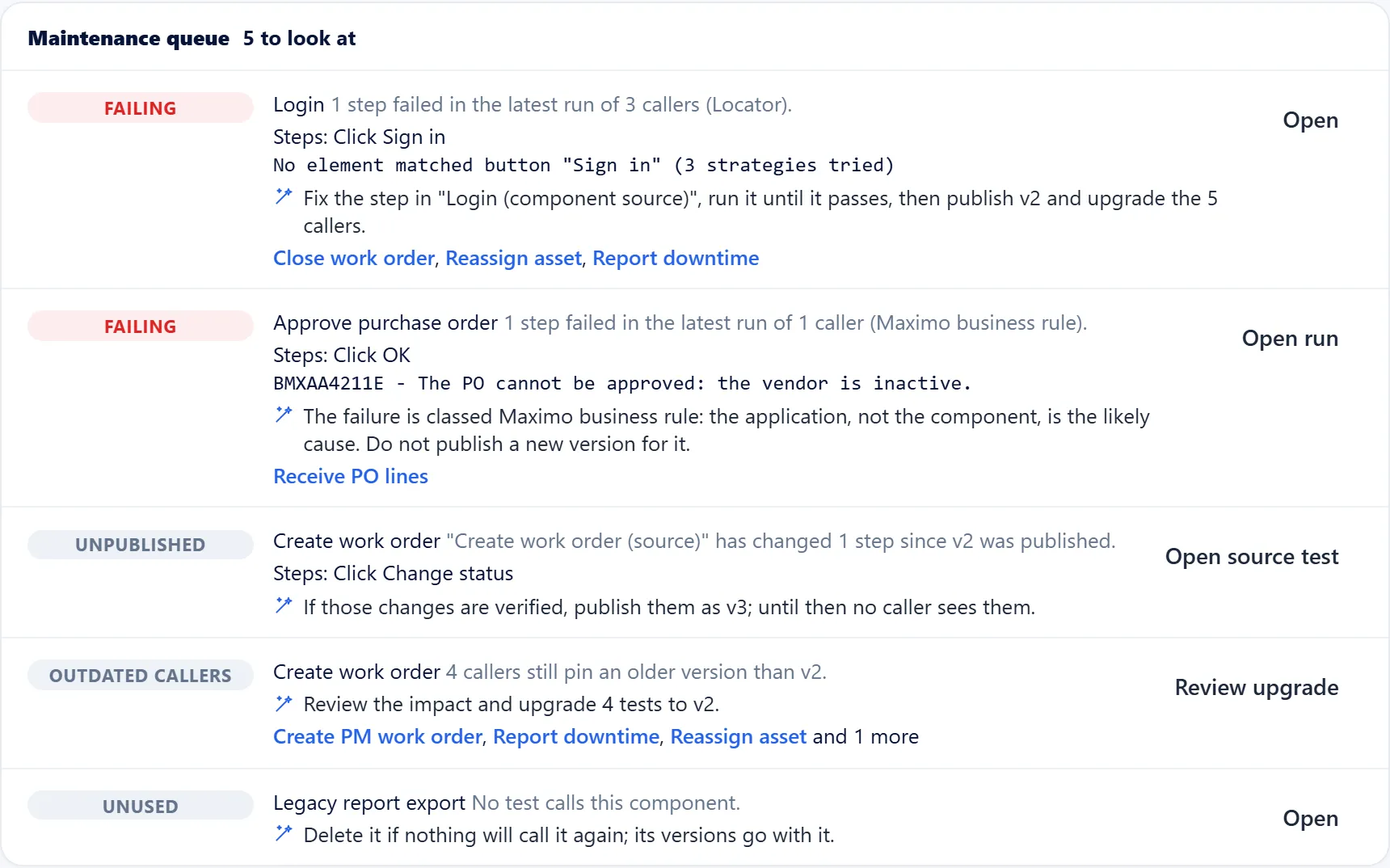
The maintenance queue suggesting what to fix first in shared components
Healing profiles

Tuned to how your application is built.

Each application can use the profile that matches how its screens are built, or your organization’s own. A preview shows what a change would have done before you save it.

Balanced

Most applications: stable ids and test hooks count most, then the name and label.

Generated ids

Applications that generate ids and classes, such as Maximo, Salesforce or ExtJS: trust the label, heading and table row over the id.

Test hooks

Applications with data-testid on every control: a matching hook decides, a renamed one is a real change.

Dense grids

Screens with many look-alike controls in rows: the row and section count more.

Request a session

See a renamed button healed on your own application.

In 30 minutes: a live demo of AI drafting, healing and explaining tests on a representative flow, and what your team would need for a pilot.