
Most MAS migrations don’t fail on the upgrade. They fail in the first week after it, on a workflow that nobody re-tested, an integration nobody remembered, or a defect that was already there but now gets blamed on MAS.
This plan is about proving the business still works, not about how to install MAS: that is your migration partner’s job. It has six phases, and every one has a sheet in the test plan workbook. If you don’t have a regression checklist yet, build one first with theMaximo regression guide. This plan reuses its workflows and tiers.
What a MAS move changes, and what it doesn’t
Maximo Application Suite runs on Red Hat OpenShift, and Maximo’s asset management functions live in its Manage application. For testing, what matters is which parts of your system stay put and which move:
| What | |
|---|---|
| Usually the same | Your data, most Manage applications and their business rules, automation scripts, workflow processes, escalations, domains and security groups move with the database. |
| Often different | The URL. The sign-in page, now MAS’s own and often connected to your SAML or LDAP directory. How screens look, depending on the version. How REST integrations authenticate, commonly with API keys. |
| Needs work | Java customizations, which have to be packaged for MAS. Add-ons and industry solutions, which have their own MAS versions. Maximo Anywhere, which is replaced by Maximo Mobile. |
The details depend on your MAS version and your add-ons. Confirm the list with your migration partner. The test plan below works either way, because it compares outcomes, not internals.
1Record a baseline first
Before anything changes, run your Smoke and Core workflows on the current Maximo and keep the results: passed or failed, the date, the version, and the evidence. This is the most important phase, and the easiest to skip.
Without a baseline, every failure on MAS starts an argument: is it the migration, or was it always like that? With one, the answer is in a spreadsheet. Record the failures too, with their tickets. A workflow that already fails before the move is not a migration defect, and shouldn’t hold the cutover.
- Use the same test data you will use on MAS. If MAS UAT is built from a copy of production, take the baseline on a copy from the same point.
- Keep the evidence: screenshots or reports you can open months later, when someone asks “did this work before?”
- Freeze changes to the workflows in the baseline, or re-run it after each change.
2Map what will change
List every part of your system that the move could affect, and name the workflow that proves each one still works. Two sheets of the workbook:
- Customizations: automation scripts, workflow processes, escalations, Java classes, conditional UI, Application Designer changes, domains and BIRT reports. Each one gets the ID of a workflow that exercises it. A customization without a workflow is untested.
- Integrations: every interface in and out, its mechanism (publish channel, REST or OSLC API, flat file, cron task), how it signs in today, and how it will on MAS.
Ask the people who run Maximo every day, not just the documentation. The integration that breaks after cutover is usually the one somebody set up years ago and nobody wrote down.
3Compare every workflow
Run the same workflows, with the same data, on MAS. Put each result next to its baseline on the2. Workflow comparison sheet, and give every difference one classification:
| Classification | When | What to do |
|---|---|---|
| Same | Passed on both, or failed the same way on both. | Nothing. |
| Expected change | MAS behaves differently by design: a new sign-in page, a renamed button. | Update the test, not the system. |
| Defect | The business outcome is wrong: a status, a cost, a missing record, a workflow that doesn’t route. | Log it in the issue log. |
| Test update | The test can’t find something that still works. | Fix the test. |
| Data | The record the test needs is missing, or in another state, on MAS. | Fix the data. |
| Environment | MAS can’t be reached, a service is down, a certificate is wrong. | Fix the environment. |
| Already failing | It failed in the baseline too. | Not a migration issue. Keep its existing ticket. |
The classification is what makes the comparison useful. Fifty red results is a crisis. Fifty results that break down into “40 expected changes at sign-in, 6 test updates, 3 data and 1 defect” is a plan.
Expect the first run on MAS to fail early and often, mostly at sign-in and on screens that look different. Fix those first: until a test can get past the sign-in page, it can’t tell you anything about the workflow behind it.
4Test integrations end to end
Integrations fail quietly. The screen looks fine while messages pile up in an error queue. Test each one from the 3. Integrations sheet like this:
- Send a real payload, the kind production sends, not a minimal one.
- Check the outcome in Maximo: the record exists, with the right values and status.
- Check the other side: the message arrived, and the receiving system accepted it.
- Send a bad payload on purpose, and check it lands in the error queue or the rejected file, not nowhere.
- Check how it signs in on MAS. An integration that used a Maximo user and password may need an API key now.
Do the inbound and outbound directions separately, and get the owner of the other system to confirm their side. An integration that “passed” because nothing errored on the Maximo side hasn’t passed.
5Track issues to exit criteria
Every difference classified as a Defect goes in the 5. Issue log with a severity, an owner and a retest. Agree the exit criteria with the business before testing starts, not the week before cutover:
- Every Smoke and Core workflow has run on MAS, and every difference is classified.
- No open Critical or High defect, or each one has a workaround that the business has signed off.
- Every integration has passed end to end, including its error path.
- Every customization has a workflow that proves it, and that workflow passed.
- Each test user role signed in through the MAS sign-in and saw only what it should.
- Reports in daily use return the same totals as the baseline, for the same parameters.
- Tests changed for expected differences have been re-run, so regression testing is ready for production.
- A Smoke run is planned for straight after cutover, and someone is named to read it.
Re-run the full comparison after the last fix, not just the fixed workflows. A fix to one workflow is itself a change, and the comparison is your regression test.
6Cutover and the first week
On cutover day, run the Smoke tier against production MAS as soon as it’s up, using workflows that are safe in production (read-only checks, or records you can cancel), and have someone named to read the results. Then keep the Smoke tier running every day through the first weeks. The baseline you recorded in phase 1 becomes the regression suite for life on MAS, and the regression checklist takes over from here.
Running it in AutoTestX
The plan works on paper. This is how the same plan runs in AutoTestX, and what each part needs.
One test, two environments
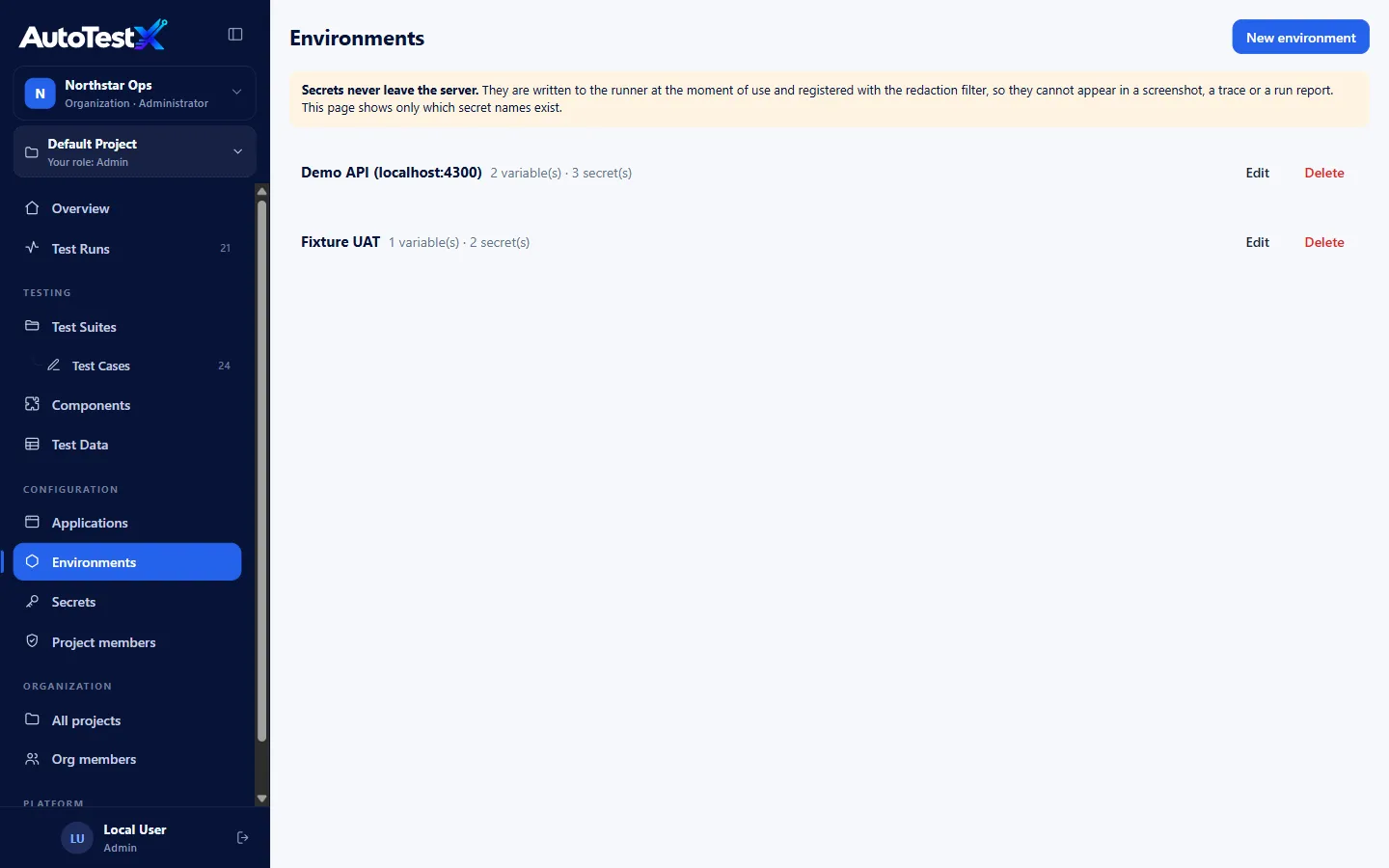
An AutoTestX test never contains a URL or a password: it takes them from the environmentit runs against. Create one environment for your current Maximo and one for MAS, with the same variable names (baseUrl, site) and the same secret names. The same tests then run against either, unchanged, and the baseline and the comparison are the same suite run twice.
Sign-in in one place
Put the sign-in steps in a Login component that every test calls, so the MAS sign-in is changed once, not in every test. Components are versioned, and each test is moved to a new version deliberately, with a record of what changed. Self-healing never heals a sign-in failure, so this is the one change to make by hand.
Screens that look different
When a field can’t be found because the screen changed, self-healing compares the page with the last passing run, using the Generated ids profile that suits Maximo’s screens, and proposes the fix with its evidence. A person approves each one, so a moved field is a two-minute review, not a rewrite. Steps that delete, approve or submit stop instead of carrying on with a match that isn’t near-certain.
Integrations
HTTP request and Poll API steps call Manage’s REST API directly, with the API key kept as an environment secret. A test can post an inbound message, wait for the record to appear, and check its values, in the same report as the screen steps.
Classifying the differences
Every failed run gets a failure class from fixed rules, which maps closely to the classifications in phase 3. Locator usually means a test update or an expected change.Authentication / permission points at sign-in or API keys. Environment means MAS couldn’t be reached. Maximo business rule, from a BMXAA…E message, and Wrong value are the ones to check for defects.
The release evidence report compares a release with earlier runs of the same suite on the same environment. So if MAS replaces your test environment in place, label the runs before and after (for example 7.6.1.3 and MAS 9.0). On Business and Enterprise, each failure is then markedRegression, New or Known, and the report downloads as a PDF for sign-off. If the old and new systems run side by side, they are two environments: compare their suite runs on the comparison sheet.
AutoTestX tests applications that run in a browser. Maximo Mobile is out of scope. SeeEnvironments,Components andAPI testing in the documentation.
Start on the Free plan, automate your first Smoke workflow against your current Maximo, and run the same test on MAS when it’s ready. No credit card.